
Artificial Intelligence is no longer a futuristic concept reserved for technology companies. It has become a practical business tool that is helping professionals work faster, make better decisions, automate repetitive tasks, and create new income opportunities.
Whether you are a marketer, software developer, designer, entrepreneur, consultant, freelancer, or business owner, AI can significantly improve your productivity and help you stay competitive in an increasingly digital economy.
The biggest misconception about AI is that it will replace professionals. In reality, AI is creating demand for professionals who know how to combine human creativity, business understanding, and AI-powered execution.
After evaluating multiple AI platforms, we believe professionals should focus less on learning dozens of tools and more on mastering a small ecosystem that covers research, content creation, design, automation, and execution.
For most professionals, a combination of ChatGPT, Canva AI, Notion AI, and one specialized tool related to their industry is often sufficient to achieve significant productivity gains.
In this guide, we explore 12 AI tools that can help professionals build websites, design products, create content, write code, automate operations, and launch digital businesses faster than ever before.
| Tool | Best For | Skill Level |
| ChatGPT | Content, Research, Productivity | Beginner |
| Claude | Writing and Analysis | Beginner |
| Perplexity | Research and Information Gathering | Beginner |
| Canva AI | Design and Marketing Content | Beginner |
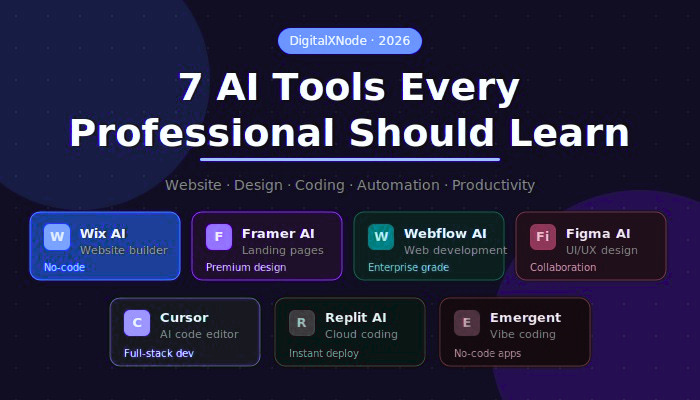
| Wix AI | Website Creation | Beginner |
| Framer AI | Landing Pages and Branding | Beginner to Intermediate |
| Webflow AI | Professional Website Development | Intermediate |
| Figma AI | UI/UX Design | Intermediate |
| Cursor | AI-Assisted Coding | Intermediate |
| Replit AI | Cloud Development | Beginner to Intermediate |
| Notion AI | Documentation and Productivity | Beginner |
| Emergent | Full-Stack AI Development | Intermediate to Advanced |
Across industries Businesses are accepting AI as a mechanism that improves competence, reduces operational costs, and quickens innovation
Professionals who understand AI-assisted workflows can:
As AI continues to reshape industries, professionals must also focus on developing future-ready capabilities. If you’re planning a long-term career strategy, explore our guide on Future-Proof Digital Marketing Skills for 2026 to understand which skills are expected to remain in high demand.
For professionals who are just beginning their AI journey, our AI Career Roadmap for Beginners provides a structured path to learning AI skills and building a future-ready career.
ChatGPT has become one of the most widely used AI tools for professionals worldwide.
It helps users generate content, brainstorm ideas, summarize information, write emails, create reports, and solve business problems.
Best Use Cases
Who Should Learn It
Claude is known for its strong writing capabilities and ability to process large amounts of information.
Many professionals use Claude to review documents, generate detailed reports, and perform in-depth analysis.
Best Use Cases
Who Should Learn It
Perplexity combines AI with real-time web research.
Instead of manually searching multiple websites, users can receive summarized answers with source references.
Best Use Cases
Who Should Learn It
Canva AI simplifies graphic design for non-designers.
Experts can design social media posts, marketing notes or tools or additional collaterals, presentations, and business illustrations without expertise in designing skills.
Best Use Cases
Who Should Learn It
Wix AI enables users to create websites using simple prompts.
Wix AI creates layouts, content ideas, and design structures automatically
Best Use Cases
Advantages
Framer AI helps professionals create visually impressive websites and landing pages.
Its focus is on design quality and user experience.
Best Use Cases
Advantages
Webflow AI provides more flexibility than many website builders.
It is ideal for businesses that need professional websites with advanced customization.
Best Use Cases
Advantages
Figma AI is changing UI and UX model and design
It enables teams to collaborate, generate layouts, create prototypes, and accelerate product development.
Best Use Cases
Advantages
Cursor is one of the fastest-growing AI coding assistants.
It helps developers generate code, debug issues, understand codebases, and accelerate software development.
Best Use Cases
Advantages
Replit AI combines coding, testing, deployment, and collaboration in a browser-based environment.
Best Use Cases
Advantages
Notion AI helps professionals organize knowledge, create documentation, and manage projects efficiently.
Best Use Cases
Advantages
Emergent focuses on AI-assisted software engineering and automation.
It enables users to build applications using natural language instructions.
Best Use Cases
Advantages
After evaluating various AI platforms and their practical applications across industries, the DigitalXNode team recommends the following AI tool combinations based on professional roles and business requirements.
These recommendations are designed to help professionals focus on the tools that can deliver the greatest productivity gains without overwhelming themselves with dozens of platforms.
Freelancers often need to manage content creation, branding, client communication, and website development with limited resources.
Recommended Tools:
Small businesses need affordable solutions that improve efficiency, strengthen online presence, and support growth.
Recommended Tools:
Marketing professionals need tools that help with content creation, campaign planning, research, and audience engagement.
Recommended Tools:
Developers benefit most from tools that accelerate coding, testing, deployment, and project execution.
Recommended Tools:
For most professionals starting their AI journey, there is no need to learn dozens of platforms simultaneously. A combination of one productivity tool, one creative tool, and one industry-specific AI platform is often enough to achieve significant efficiency gains and build a strong foundation for future growth.
This progression allows professionals to move from basic productivity tools to advanced development and automation platforms.
Which AI tool is best for beginners?
ChatGPT, Canva AI, Wix AI, and Notion AI are beginner-friendly and require little technical knowledge.
Which AI tool is best for software developers?
Emergent, Replit AI and Cursor are exceptional options for developers and technical experts.
Can AI tools replace professionals?
No. AI improves productivity but still requires human creativity, business understanding, decision-making, and strategic thinking.
Which AI tool is best for small businesses?
ChatGPT, Canva AI, Wix AI, and Notion AI offer significant value for small business owners.
Are these AI tools free?
Most platforms offer free plans, although advanced features usually require paid subscriptions.
What is the most valuable AI skill in 2026?
The ability to combine AI tools with domain expertise and problem-solving skills is likely to be one of the most valuable professional capabilities.
AI is swiftly turning to be integral part of normal business operations. The professionals who learn how to use AI effectively will be better equipped to adapt, innovate, and grow in the years ahead.
Rather than viewing AI as a threat, professionals should see it as a powerful partner that can amplify creativity, accelerate execution, and unlock new opportunities.